Disclaimer: This procedure changes the license state of a vSAN Witness Appliance and may temporarily affect the witness configuration in a stretched cluster or 2-node cluster. Make sure you have a maintenance window and verify the health/state of the cluster before you begin.
Broadcom/VMware documents that the vSAN Witness Appliance includes an embedded vSphere license and does not require a separate purchased license for the virtual appliance itself. There is also an official KB for cases where the witness shows up with an expired or evaluation license in vCenter after a major upgrade. But if the original embedded key has actually been overwritten, the normal disconnect/reconnect workaround may not be enough.
I recently ran into a situation where the embedded license on a vSAN Witness Appliance had been overwritten with a regular ESXi license key.
The witness appliance is supposed to use its built-in embedded license, so this needed to be reverted.
If the witness is still part of a vSAN stretched cluster or 2-node configuration, remove it from that configuration first.
Below is the procedure that worked for me.
Steps
- Disable the stretched cluster / witness configuration if the witness is currently in use.
- Enable SSH on the witness appliance.
- Disconnect the witness from vCenter.
- Log in to the witness host UI and remove the manually assigned license.
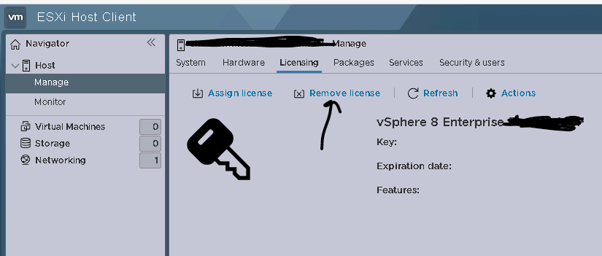
- SSH to the witness appliance and run:
rm -r /etc/vmware/license.cfg
cp /etc/vmware/.#license.cfg /etc/vmware/license.cfg
/etc/init.d/vpxa restart
esxcfg-advcfg -s 1 /VSAN/HostDeployedFromWitnessOVF
- Reboot
- Remove the witness host from the vCenter inventory.
- Add the witness host back to vCenter.
- Accept that it may initially show as using an evaluation license.
- Reboot the host once more from vCenter.
- Disconnect and reconnect the witness host in vCenter.
- Wait a few minutes and verify that the embedded witness license is back.
- Re-add the witness to the stretched cluster / 2-node configuration.
Final note
If the issue is only that the witness shows as expired/evaluation in vCenter after an upgrade, try the simpler workaround first: set /VSAN/HostDeployedFromWitnessOVF to 1, reboot, wait a few minutes, and disconnect/reconnect the host in vCenter.


